The image is saved at outputs/Qwen_image_2.1_00002.png. It is 3:2 landscape and took about 175 seconds. The seed was 895035350286699.
Prompt used: I expanded your idea into one English paragraph. It keeps your details exactly: a red vintage bicycle, an old brick wall, late-afternoon light, a quiet small-town European street, photographic style, landscape, and no text. I added these details myself, because you left them open:
- Cobblestones.
- A step-through frame, curved handlebars and a leather saddle.
- The bicycle placed slightly left of center.
- Side light with long shadows.
- Shallow depth of field.
Workflow changes: I changed only three values.
- The prompt text in node
459:474.on_false. The workflow's prompt-rewriting switch is off, so this is the text that reaches the model. I left the switch off. - A random seed in the KSampler.
- The aspect ratio, set to "3:2 (Photo)". Your workflow has no plain "landscape" choice. I picked 3:2 over 16:9 because it suits a photographic look.
The model, steps, sampler and everything else are as in your file.
Does it match? Yes, closely, from looking at the picture.
- Bicycle: A red vintage step-through bicycle leans against a brick wall. It has a brown leather saddle, curved handlebars and spoked wheels. It reads as a vintage city bike.
- Wall and street: The wall is old, weathered brick with patches of ochre plaster. The street is narrow and cobbled, with old buildings with barred windows receding into a blurred background. It looks like a small European town, Italian in feel, and it is empty and quiet.
- Light: It is warm and golden, with side light raking across the bricks. It reads as late afternoon.
- Style: It looks like a photograph, with shallow depth of field and natural texture.
- Text: I see none.
Minor caveats:
- The bicycle is lit only softly, and the strongest light is on the wall behind it. The cobbles in front are fairly dark, so I don't see the long cast shadows I asked for.
- The bicycle's rear section and rack are slightly muddled, which is typical of AI-generated bicycles. It is fine at this size but may show up if you zoom in.
If you want stronger golden light on the bicycle itself or clearer cast shadows, I can add that to the prompt and run another seed.
Test run on my own ComfyUI 0.39.2 (macOS, Apple Silicon), with the Qwen Image 2.1 text-to-image workflow, prompt rewriting left off. The picture was generated for real in about 175 seconds and I looked at it myself: it matches the request, with softer light and fewer long shadows than asked and a slightly muddled rear of the bicycle. The image itself is not embedded here. An earlier attempt was cancelled by me part-way and is not counted. The tester's local server and models are needed to repeat it.
它做什么
把“想要一张图”的需求变成由你本机 ComfyUI 生成的图片。它先检查服务(版本、设备、队列),以及你的工作流能不能运行:它用到的每种节点、每个模型文件或选项都必须存在,否则就停下并明确说缺什么,不会替你换模型。然后它找到提示词、种子和尺寸在工作流里的位置,把一个简短的想法扩写成清晰的提示词,同时保留你固定的细节(必须出现的文字、数量、颜色),先用试运行校验一切,再提交任务、等待、保存 ComfyUI 生成的图片,并亲自看一眼结果,告诉你哪些符合、哪些不符合。模型和风格来自你提供的工作流。
输出
你指定文件夹里的图片文件、使用的提示词和种子、工作流里改动过的值,以及对图片的如实核对。
使用前准备
- ComfyUI 必须已经在运行,并且你的工作流已保存为 API 格式。
- 请先把工作流用到的所有模型文件下载好(主模型、文本编码器、VAE 以及用到的 LoRA),放进 ComfyUI 对应的模型文件夹。这个 Skill 只会检查它们是否存在,缺了就停下,但绝不会下载任何东西。
- 较新的模型可能用到只有新版 ComfyUI 才有的节点。如果检查提示缺节点,请先更新 ComfyUI。
测试环境
ComfyUI 0.39.2,macOS 15.3,Apple M4 Max,64 GB 统一内存(MPS 设备)。工作流:Qwen Image 2.1 文生图,关闭了它自带的提示词改写。模型:qwen_image_2.1_int8_convrot(主模型)、qwen3vl_8b_int8_convrot(文本编码器)、qwen_image_2.1_vae_bf16(VAE)。一张 3:2 的图约 175 秒。其他工作流没有测试。
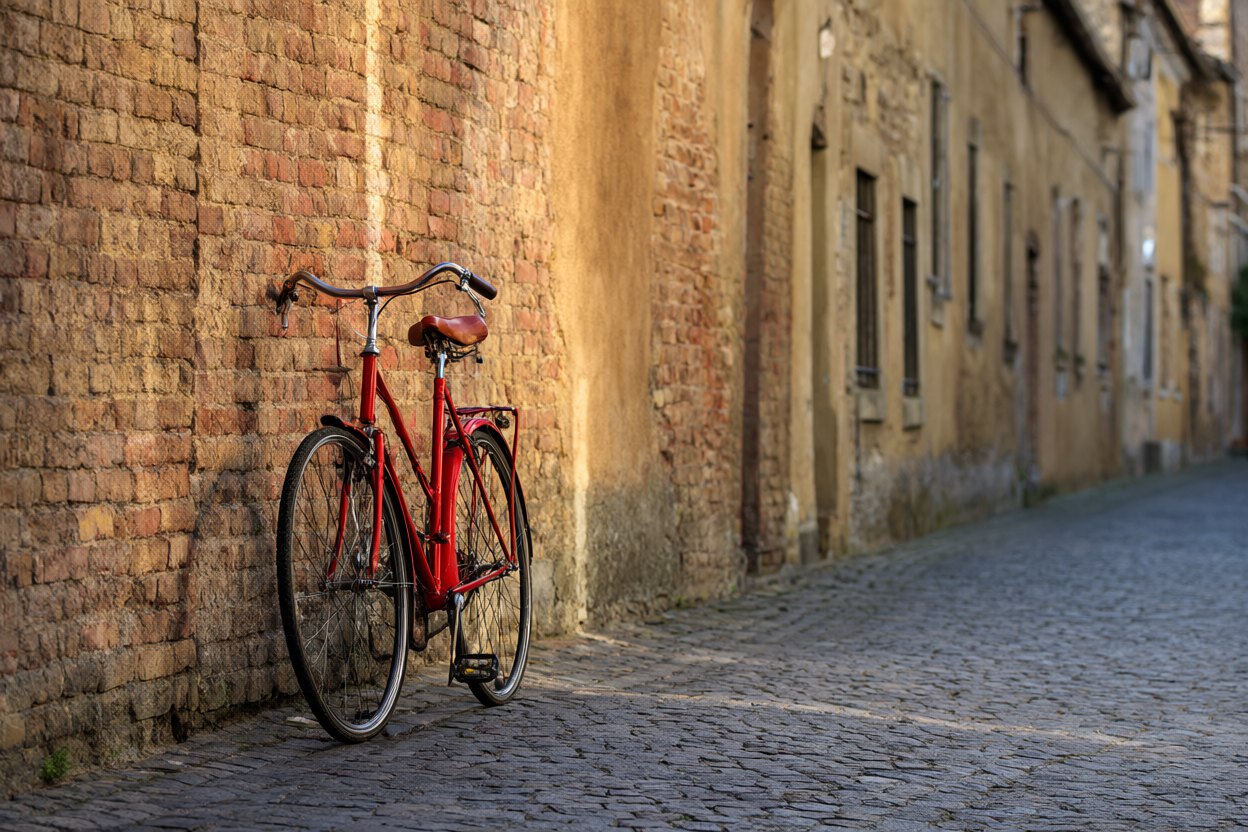
测试中生成的图片:Qwen Image 2.1,3:2,25 步,种子 895035350286699,约 175 秒。下面的提示词是智能体根据一句话需求写出来的;图片保持生成时的样子,没有修图。
A photograph of a red vintage bicycle leaning against an old, weathered brick wall on a quiet cobblestone street in a small European town. The bicycle stands slightly left of center, filling about a third of the frame, with a classic step-through frame, curved handlebars and a leather saddle. Low late-afternoon sun comes from the side, casting warm golden light and long soft shadows across the bricks and cobbles; the muted ochre and terracotta wall contrasts with the saturated red of the bicycle. Empty street with softly blurred old buildings in the background. Natural documentary photography, shallow depth of field, landscape composition, no text, no signs, no lettering.
适合什么场景
已经在用 ComfyUI、想让智能体写提示词、运行工作流并汇报结果的人。需要 ComfyUI 正在运行,以及保存为 API 格式的工作流。
中风险:需要你自己的 ComfyUI。它包含一个 Python 脚本(只用标准库),连接 127.0.0.1 的 ComfyUI,遇到其他地址会拒绝,除非你明确允许;ComfyUI 没有登录,请不要把它暴露到网络上。它不会启动或停止服务,不安装节点、不下载模型,只把图片文件写进输出文件夹。一次任务会占用你的 GPU 和内存几分钟。已在 macOS 上用 Qwen Image 2.1 真实试用:约 175 秒出了一张符合要求的图,图片本身没有放在演示里。请先下载好工作流需要的所有模型,Skill 只检查、绝不下载。仅在 ComfyUI 0.39.2 和 Qwen Image 2.1 工作流上测试过。AIBars 原创(MIT)。