The image is saved at outputs/Qwen_image_2.1_00002.png. It is 3:2 landscape and took about 175 seconds. The seed was 895035350286699.
Prompt used: I expanded your idea into one English paragraph. It keeps your details exactly: a red vintage bicycle, an old brick wall, late-afternoon light, a quiet small-town European street, photographic style, landscape, and no text. I added these details myself, because you left them open:
- Cobblestones.
- A step-through frame, curved handlebars and a leather saddle.
- The bicycle placed slightly left of center.
- Side light with long shadows.
- Shallow depth of field.
Workflow changes: I changed only three values.
- The prompt text in node
459:474.on_false. The workflow's prompt-rewriting switch is off, so this is the text that reaches the model. I left the switch off. - A random seed in the KSampler.
- The aspect ratio, set to "3:2 (Photo)". Your workflow has no plain "landscape" choice. I picked 3:2 over 16:9 because it suits a photographic look.
The model, steps, sampler and everything else are as in your file.
Does it match? Yes, closely, from looking at the picture.
- Bicycle: A red vintage step-through bicycle leans against a brick wall. It has a brown leather saddle, curved handlebars and spoked wheels. It reads as a vintage city bike.
- Wall and street: The wall is old, weathered brick with patches of ochre plaster. The street is narrow and cobbled, with old buildings with barred windows receding into a blurred background. It looks like a small European town, Italian in feel, and it is empty and quiet.
- Light: It is warm and golden, with side light raking across the bricks. It reads as late afternoon.
- Style: It looks like a photograph, with shallow depth of field and natural texture.
- Text: I see none.
Minor caveats:
- The bicycle is lit only softly, and the strongest light is on the wall behind it. The cobbles in front are fairly dark, so I don't see the long cast shadows I asked for.
- The bicycle's rear section and rack are slightly muddled, which is typical of AI-generated bicycles. It is fine at this size but may show up if you zoom in.
If you want stronger golden light on the bicycle itself or clearer cast shadows, I can add that to the prompt and run another seed.
Test run on my own ComfyUI 0.39.2 (macOS, Apple Silicon), with the Qwen Image 2.1 text-to-image workflow, prompt rewriting left off. The picture was generated for real in about 175 seconds and I looked at it myself: it matches the request, with softer light and fewer long shadows than asked and a slightly muddled rear of the bicycle. The image itself is not embedded here. An earlier attempt was cancelled by me part-way and is not counted. The tester's local server and models are needed to repeat it.
What it does
Turns a request for a picture into an image made by the ComfyUI running on your machine. It checks the server first (version, device, queue) and whether your workflow is runnable: every node type and every model file or choice it names must exist, otherwise it stops and says exactly what is missing, and it does not swap models. It then finds where the prompt, seed and size live in your workflow, expands a short idea into a clear prompt that keeps your fixed details (any text that must appear, counts, colors), validates everything with a dry run, submits the job, waits, saves the images ComfyUI produced and looks at the result to tell you what matches and what does not. The model and style come from the workflow you give it.
Output
The image file(s) in a folder you choose, the prompt and seed used, the values changed in the workflow and an honest check of the picture.
Before you start
- ComfyUI must already be running, and your workflow saved in API format.
- Download every model file your workflow uses first (main model, text encoder, VAE and any LoRA) and put them in the right ComfyUI model folders. This Skill checks that they exist and stops if one is missing, but it never downloads anything.
- Newer models may need nodes that only recent ComfyUI versions have. Update ComfyUI first if the check reports missing nodes.
Tested with
ComfyUI 0.39.2 on macOS 15.3, Apple M4 Max with 64 GB of unified memory (the MPS device). Workflow: Qwen Image 2.1 text-to-image, with its own prompt rewriting left off. Models: qwen_image_2.1_int8_convrot (main model), qwen3vl_8b_int8_convrot (text encoder), qwen_image_2.1_vae_bf16 (VAE). One 3:2 image took about 175 seconds. Other workflows were not tested.
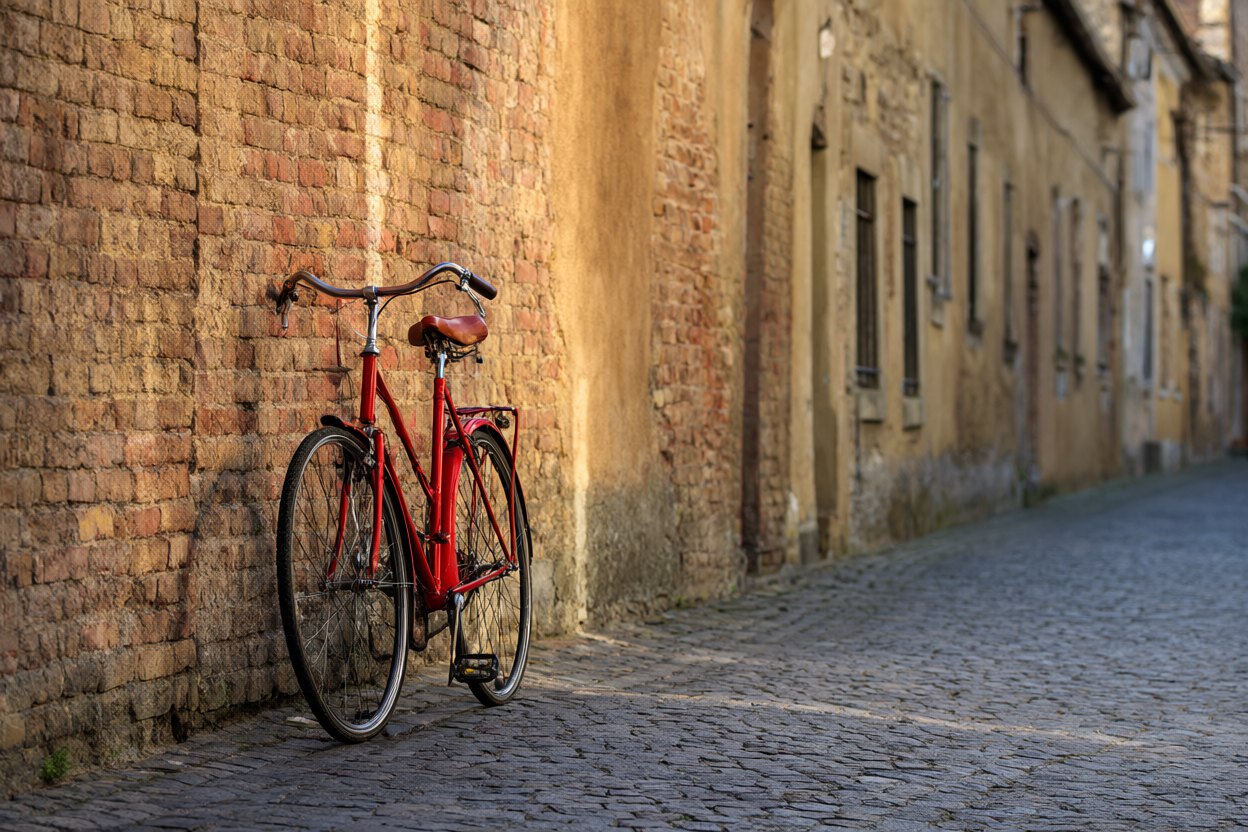
The picture made in the test run: Qwen Image 2.1, 3:2, 25 steps, seed 895035350286699, about 175 seconds. The agent wrote the prompt below from a one-line request; the picture is shown as it came out, not retouched.
A photograph of a red vintage bicycle leaning against an old, weathered brick wall on a quiet cobblestone street in a small European town. The bicycle stands slightly left of center, filling about a third of the frame, with a classic step-through frame, curved handlebars and a leather saddle. Low late-afternoon sun comes from the side, casting warm golden light and long soft shadows across the bricks and cobbles; the muted ochre and terracotta wall contrasts with the saturated red of the bicycle. Empty street with softly blurred old buildings in the background. Natural documentary photography, shallow depth of field, landscape composition, no text, no signs, no lettering.
Good for
People who already run ComfyUI and want an agent to write the prompt, run the workflow and report back. It needs ComfyUI running and a workflow saved in API format.
Medium risk: needs your own ComfyUI. It includes one Python script (standard library only) that talks to ComfyUI at 127.0.0.1 and refuses other addresses unless you allow them; ComfyUI has no login, so do not expose it to a network. It never starts or stops the server, installs nodes or downloads models, and writes only image files into the output folder. A job uses your GPU and memory for minutes. Test-run for real with Qwen Image 2.1 on macOS: one image in about 175 seconds that matched the request; the picture is not embedded here. Download every model your workflow needs first; the Skill checks but never downloads. Tested only with ComfyUI 0.39.2 and the Qwen Image 2.1 workflow. Original by AIBars (MIT).